Usage
To run your Spark jobs on HiperGator, two separate steps are required:
- Create a Spark cluster on HiperGator via SLURM. This section "Spark Cluster on HiPerGator" below shows a simple example how to create a Spark cluster on HiperGator.
- Submit your job to your Spark cluster. You can do this either interactively at the command line ("Spark Interactive Job" section below) or by submitting a a batch job ("Spark Batch Job" section below)
For Spark parameters used in this section, please refer to Spark's Homepage.
Spark Cluster on HiperGator:
Expand this section to view instructions for creating a spark cluster in HiperGator:
It is assumed that spark-local-cluster.sh is the file name of the SLURM job script for one-worker node Spark cluster in this section. Set SLURM parameters for Spark cluster. spark-local-cluster.sh is available on "Spark_Job_Scripts" page section.
#!/bin/bash
#filename: spark-local-cluster.sh
#SBATCH --job-name=spark_cluster
#SBATCH --nodes=1 # nodes allocated to the job
#SBATCH --cpus-per-task=16 # the number of CPUs allocated per task
#SBATCH --exclusive # not sharing of allocated nodes with other running jobs
#SBATCH --time=03:00:00
#SBATCH --output=spark_cluster.log
#SBATCH --error=spark_cluster.err

module load spark

## Set Spark parameters for Spark cluster
export SPARK_LOCAL_DIRS=$HOME/spark/tmp
export SPARK_WORKER_DIR=$SPARK_LOCAL_DIRS
export SPARK_WORKER_CORES=$SLURM_CPUS_PER_TASK
export SPARK_MASTER_PORT=7077
export SPARK_MASTER_WEBUI_PORT=8080
export SPARK_NO_DAEMONIZE=true
export SPARK_LOG_DIR=$SPARK_LOCAL_DIRS

mkdir -p $SPARK_LOCAL_DIRS

##Set Spark Master and Workers
MASTER_HOST=$(scontrol show hostname $SLURM_NODELIST | head -n 1)
export SPARK_MASTER_NODE=$(host $MASTER_HOST | head -1 | cut -d ' ' -f 4)
export MAX_SLAVES=$(expr $SLURM_JOB_NUM_NODES - 1)

## for starting spark master
$SPARK_HOME/sbin/start-master.sh &

## use spark defaults for worker resources (all mem -1 GB, all cores) since using exclusive
## for starting spark worker
$SPARK_HOME/sbin/start-slave.sh spark://$SPARK_MASTER_NODE:$SPARK_MASTER_PORT
Submit the SLURM job script to HiperGator
sbatch spark-local-cluster.sh
grep "Starting Spark master" spark_cluster.err
18/03/13 14:53:23 INFO Master: Starting Spark master at spark://c29a-s42.ufhpc:7077
grep "Starting Spark worker" spark_cluster.err
18/03/13 14:53:24 INFO Worker: Starting Spark worker 172.16.194.59:42418 with 16 cores, 124.3 GB RAM
Spark Interactive Job:
Expand this section to view instructions for using the Spark interactive shell on HiperGator:
Spark supports interactive job submission through the interactive shells.
Spark interactive shell in Scalar (spark-shell)
First, load spark module in the terminal where you want to submit a spark job.
module load spark
Get the location of the Spark master to connect to it through the interactive shell
SPARK_MASTER=$(grep "Starting Spark master" *.err | cut -d " " -f 9)
Connect to the master using the Spark interactive shell in scalar
spark-shell --master $SPARK_MASTER
Spark interactive shell in Python (pyspark)
Load spark module in the terminal where you want to submit a spark job.
module load spark
Get the location of the Spark master to connect to it through the interactive shell
SPARK_MASTER=$(grep "Starting Spark master" *.err | cut -d " " -f 9)
Connect to the master using the Spark interactive shell in scalar
pyspark --master $SPARK_MASTER
Example - PI estimation via pyspark
SPARK_MASTER=$(grep "Starting Spark master" *.err | cut -d " " -f 9)
pyspark --master $SPARK_MASTER
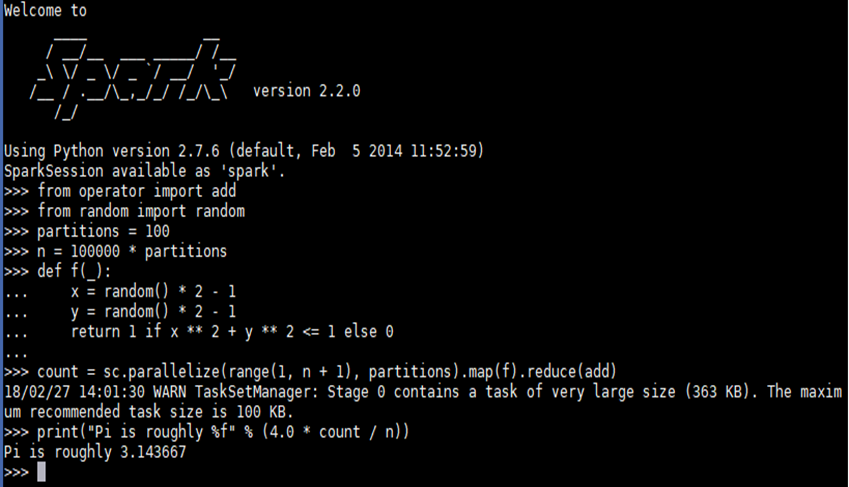
Example - Pi estimation from file with pyspark
As of Spark 2.0., Spark interactive shell in python does not load python files to run python application. Instead, “PYTHONSTARTUP”, a python environmental variable can be used to run python script with pyspark, which executes the python script before an interactive shell starts.
SPARK_MASTER=$(grep "Starting Spark master" *.err | cut -d " " -f 9)
PYTHONSTARTUP=pi_with_pythonstartup.py pyspark --master $SPARK_MASTER
pi_with_pythonstartup.py script is avaialble on "Spark_Job_Scripts" page below.
Spark Batch Job:
Expand this section to view instructions for starting preset applications without a job script:
Spark supports batch job submission through spark-submit which provides unified interface for Spark jobs
$SPARK_HOME/bin/spark-submit  \
             --class <main-class>  --master <master-url> \
             --deploy-mode <deploy-mode>  --conf <key>=<value>  \
             ... # other options  <application-jar>  [application-arguments]
--class: The entry point for your application (e.g. org.apache.spark.examples.SparkPi)
--master: The master URL for the cluster (e.g. spark://123.45.67.890:7077)
--deploy-mode: Whether to deploy your driver on the worker nodes (cluster) or locally as an external client (client) (default: client)
--conf: Arbitrary Spark configuration property in key=value format. For values that contain spaces wrap “key=value” in quotes (as shown).
for instance, an hdfs:// path or a file:// path that is present on all nodes.
For further details about spark-submit, refer to https://spark.apache.org/docs/2.2.0/submitting-applications.html.
Example - Pi estimation via Spark-submit
SPARK_MASTER=$(grep "Starting Spark master" *.err | cut -d " " -f 9)
spark-submit --master $SPARK_MASTER $SPARK_HOME/examples/src/main/python/pi.py 10
