Usage
The recommended way to run RStudio on HiPerGator is to start it in Open OnDemand.
When RStudio starts the file browser will be limited to your home directory. To navigate to /blue or /orange, there are two main options:
Option 1: Create a symlink to your target directory in home:
E.g.
$ cd
$ ln -s /blue/MYGROUP/$USER/ blue
After you create a symlink you'll be able to go into the blue directory in the RStudio file browser under home.
Option 2: Change your working directory using R console:
Click on the 'Gear' menu in the RStudio file browser and choose 'Synchronize Working Directory'.
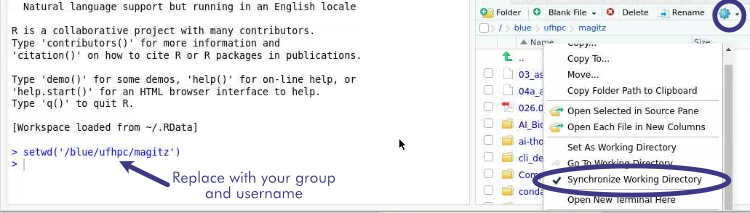
Then run the following command in the RStudo REPL and the file browser should immediately reflect the new working directory.
setwd('/blue/MYGROUP/MYUSER/')
RStudio on ResVault:
To launch RStudio on ResVault use the command $ rstudio --no-sandbox and if you have additional drives linked to your VM, bind mount those drives with the flag -B /drives/drive_name